A WordPress plugin, a PrestaShop module, guides for hosted shop platforms, automatic installation in Google Tag Manager or a single code snippet to paste. Choose what your website runs on.
WooCommerce shops too.
Plugin for WordPress websites and stores, including WooCommerce. Connects your site to your account in one click and shows the banner status and consent statistics in the dashboard.
A module or a few minutes with a guide. In every shop, turn off the built-in cookie notice so customers don't see two banners.
Module for PrestaShop 1.7, 8 and 9 stores. Install it from the store admin, connect your account and see consent statistics without leaving the back office.
You add the banner code in the IdoSell admin as an HTML add-on at the start of the head section. It takes a few minutes.
You paste the code into the custom code field for the store header. No coding, a few minutes.
You paste the code in the custom integrations settings or install the banner through Google Tag Manager connected to your store.
App for stores on Shoper, one of the largest Polish subscription e-commerce platforms. The banner gets into your store without pasting any code.
An app for Shopify stores, compatible with Shopify's customer privacy settings. Until it launches, you paste the code into your store theme.
An app for Wix sites that works with Wix consent settings - tools added in Wix will also wait for the visitor's consent.
For any website that already has a GTM container.
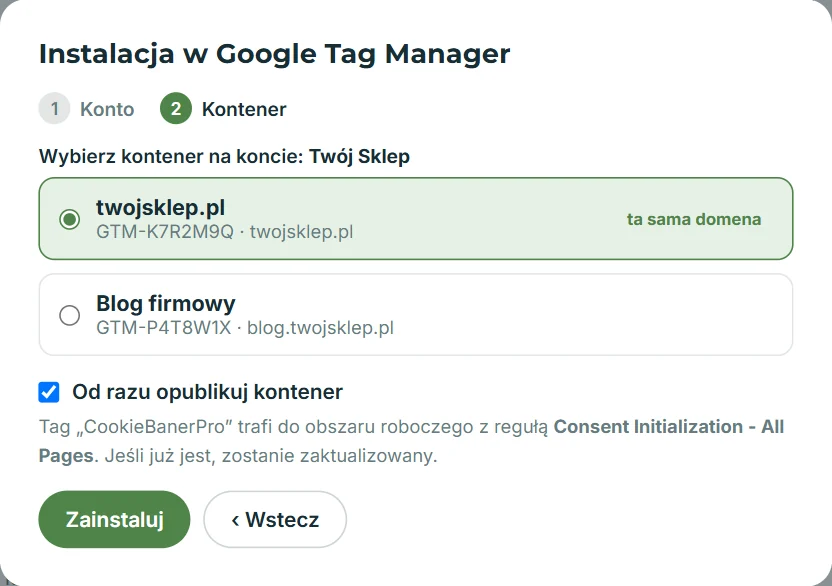
You connect your Google account, choose a container, and the tag with the consent trigger goes into GTM and is published right away. Prefer to do it by hand? Import our tag template and add it with the Consent Initialization trigger. Consent Mode v2 sets itself up.
Another system or your own code - one line in the head section.
Another system or your own code? Paste the banner code into the head section of your site. Works everywhere, including Magento and Shopify.
<script src="https://cookiebanerpro.pl/c/twoj-klucz.js"></script>...Missing your platform? Get in touch - we will show you how to install the banner, and the most requested platforms go on our list of upcoming integrations.
We are working on an IdoSell app that will do this automatically.
You set the look, texts and categories in the CookieBanerPro panel. The plugin only connects your site to your account and adds the banner code.
Create a free accountDownload the ZIP file and upload it in your site admin, for example in WordPress: Plugins, Add New, Upload Plugin.
Click “Connect” in the plugin, log in or create a free account and choose the site you want to connect.
Set up the banner in the panel and click Publish. It appears on your site automatically, and new plugin versions install with one click.
CookieBanerPro lets you quickly deploy a cookie banner and consent management on popular websites and e-commerce shops. You don’t need to build your own solution or edit code every time the configuration changes. Choose an integration method, connect your site to CookieBanerPro and manage settings from one panel.
Using WordPress? The dedicated CookieBanerPro plugin installs the cookie banner without editing your site’s code. Once the plugin is connected to your account, you configure the banner’s look, cookie categories and other settings in the CookieBanerPro panel.
The integration also works in WooCommerce shops, so you can manage consent both on a company site and in an online shop.
Shops on PrestaShop 1.7, 8 and 9 can use the dedicated CookieBanerPro module. You install it straight from the shop’s back office and, once connected to your account, manage the banner from CookieBanerPro.
CookieBanerPro can also be deployed on popular Polish e-commerce platforms.
On IdoSell and Sky-Shop you install it by adding the CookieBanerPro code to the right section of the site. RedCart lets you use custom JavaScript or Google Tag Manager.
So you can deploy the cookie banner without building a custom integration.
Google Tag Manager is a universal way to install CookieBanerPro. It is especially handy for marketers, webmasters and agencies managing many scripts.
The GTM integration also connects consent with Google Consent Mode v2, Google Analytics and Google Ads.
Not using any of these platforms? You can also install CookieBanerPro on your own HTML or PHP site or any other CMS. Just add the generated code to the <head> section.
So CookieBanerPro works both on a simple company site and on a large online shop.
Whatever the installation method, you configure the banner in the CookieBanerPro panel: look, colours, texts, cookie categories and other settings.
WordPress, WooCommerce, PrestaShop, IdoSell, Sky-Shop, RedCart, Google Tag Manager or your own site - pick an integration and start managing consent in one place.
Add your website to CookieBanerPro and set up your cookie banner without a complicated rollout.

A few minutes in the dashboard and you're done. Free plan forever, no card.